Home Ethernet
About a year ago I had my home wired with Ethernet. The previous house I had lived was cabled, and I couldn’t live in the new house without wireless backhaul. Aint nobody got time for that.
The other day I noticed that my network transfer speeds seemed slow.
Running iperf3 between my mac mini server and my laptop, I identified the network was throttling at around 97 Mbps - far from the gigabit speeds I would expect. However, that 97 number was so perfectly close to 100 Mbps that it just had to be a failed cable or terminator. The problem was, which one?
More problematic was that I couldn’t remember how the house hasd been wired. The contractors didn’t leave me with a diagram, so to diagnose the fault it was also helpful to build a map of the network.
To help my future self, here is one I created using the wonderful software Curio:
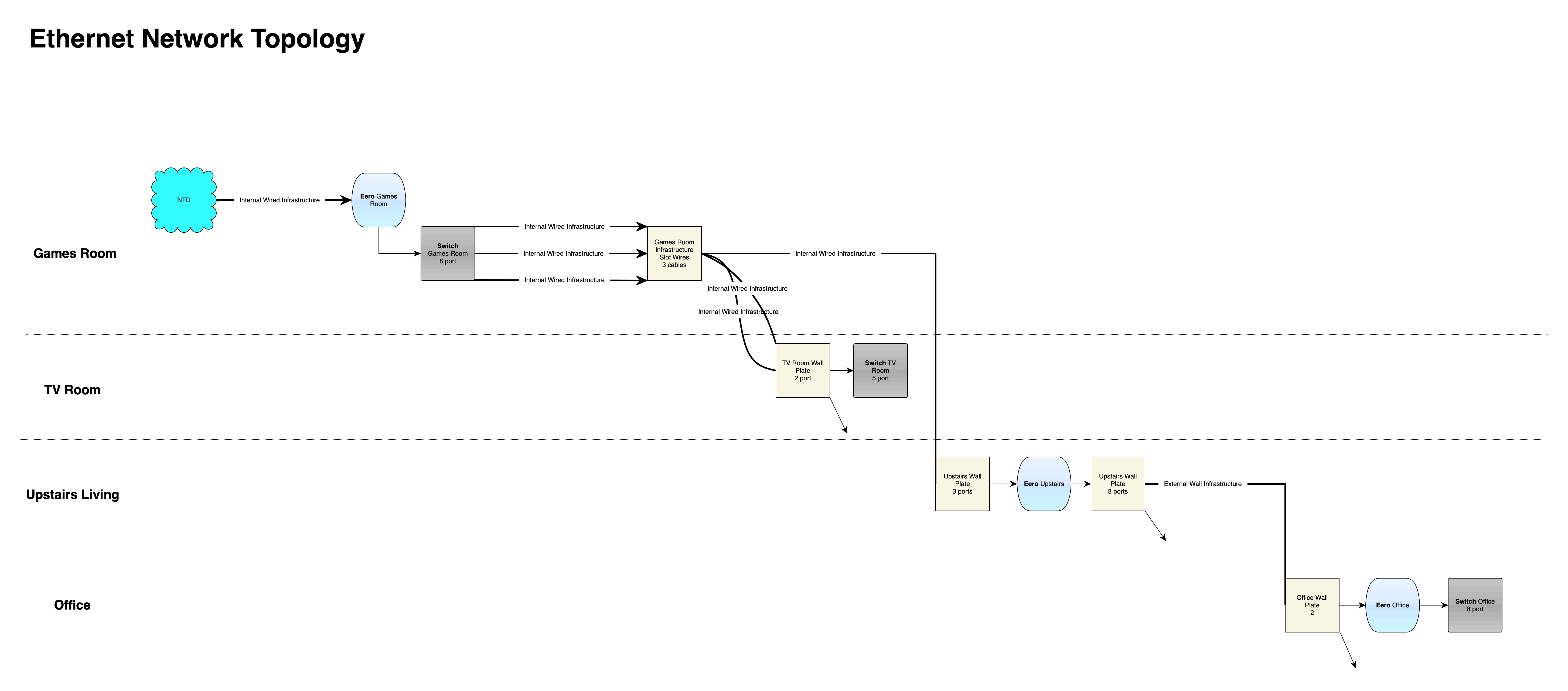
With my topology now clear I moved on to testing, slowing spanning outwards from the mac mini that was my listening end of iperf. Starting with a direct connection between it and my laptop, confirming gigabit speeds, then moving out from the server, a network layer at a time, to see where the speeds dropped.
I determined that it was a single Ethernet patch wire that was running from an Ethernet drop in my TV Room to the switch in that room that was damaged. I replaced it with a new cable, and continued to test other connections, and all were good.
My home network is performant once more, and I’m so pleased that it was a simple cable that was damaged, and not any of the infrastructure. That would have been annoying.